
Sometimes calculating project IRR and equity IRR can be tricky, and in this post we will discuss the reasons for the same.
The internal rate of return (IRR) can be defined as the rate of return that makes the net present value (NPV) of all cash flows equal to zero. In a previous post I have discussed the basic concepts and calculation of IRR and NPV. If you want to refer back, click here for the IRR-NPV post.
Calculation of the internal rate of return considering only the project cash flows (excluding the financing cash flows) gives us the project IRR.
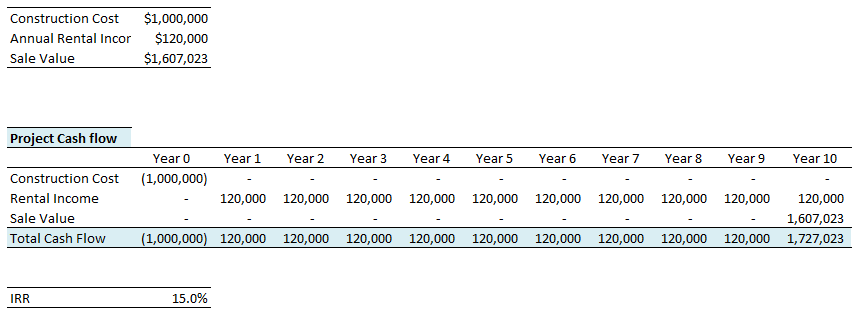
Consider a project with construction cost of $ 1,000,000 and annual rental income of $ 120,000. Assume the property will be sold in the 10th year for $ 1,607,023. You can construct the project cash flows and calculate the project IRR by using the Excel IRR formula. You can also download the excel spreadsheet for this calculation. The download link is at the end of this post.
Calculating Equity IRR
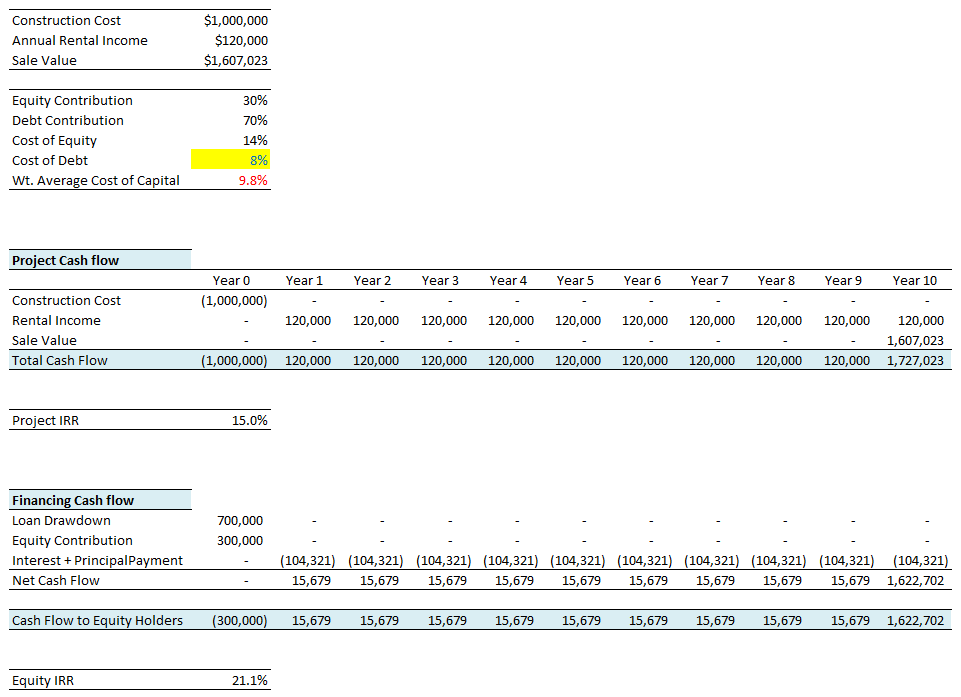
Calculation of the internal rate of return considering the cash flows net of financing gives us the equity IRR. It means the project is funded by a mix of debt and equity. If the project is fully funded by equity, the project IRR and Equity IRR will the same. If the project is fully funded by the debt, equity IRR simply doesn't exist. Now consider the same example again. Assume 30% of the project cost is funded by the equity and remaining 70% by the debt. Assume the cost of equity to be 14% and the cost of debt 8%. The weighted average cost of capital (WACC) will be 9.8%. Note that the weighted average cost of capital will not affect equity IRR. It is only the cost of debt which matters. Assume the term of debt is 10 years. You can project the cash flows for equity holders and calculate the equity IRR using the same Excel formula as above. This is demonstrated below:
Wasn't it simple? It is.
Can equity IRR be lower than project IRR?
Some readers often ask me if the equity IRR can be lower than the project IRR. And I always say the same thing - yes, it can be. So, in what circumstances the equity IRR will be lower than project IRR? The equity IRR will be lower than the project IRR whenever the cost of debt exceeds the project IRR. Note it is the cost of debt and not the weighted average cost of capital. See below the relationship between the cost of debt and equity IRR.
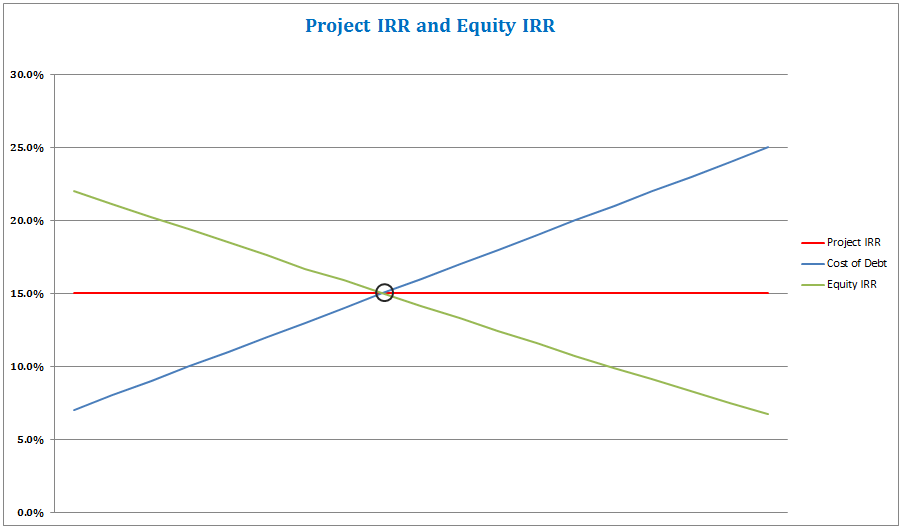
In the above chart, did you notice that when the cost of debt is equal to the project IRR, the equity IRR is equal to the project IRR. Note that the cost of equity doesn't impact either the project IRR or the equity IRR. Cost of equity affects the weighted average cost of capital (WACC) and hence the NPV calculation. It affects both project NPV and NPV for the equity holders.
If you are looking for the relation between project NPV and equity NPV, refer this post Net Present Value and Returns to the Equity Holders.
Additional reading on Internal Rate of Return (IRR):
- Solving for the Multiple IRRs in Excel
- Can Equity IRR be lower than Project IRR?
- What is Incremental IRR?
- The Curious Case of Negative IRR
- Shareholder Loan and Equity IRR
- Why don’t we use Excel’s MIRR formula?
- IRR Calculation in Excel: Formulae and Use
- Project IRR and Equity IRR Video
- Rental Yield and Project IRR Video
You can download the project IRR and equity IRR calculation spreadsheet for FREE. It also has this interactive graph and the loan amortization schedule.
Hope you enjoyed this post on project IRR and equity IRR. What do you think, use the comment section below.
Download the Excel File:

Feasibility.Pro Student Edition is 100 % Free Forever
Students and educators get the full desktop modeling engine at no cost. Verify your academic email once and keep using it for life.
Instant Download
Grab the Windows installer with one click – no credit card needed
Local Desktop App
Run natively on your PC for fast modeling and full offline access
Lifetime License
Verify once with your .edu or .ac email and renew annually at no cost
How It Works
STEP 1
Visit Download & Register
Go to download.feasibility.pro and click “Sign Up” to create your trial account. No credit card needed.
STEP 2
Download & Install
Download the Windows installer (.exe), run it, and follow the prompts (Next → Next → Finish). Feasibility.Pro will be ready on your desktop.
STEP 3
Verify & Unlock
Open the app, log in with your institutional email, then email support@feasibility.pro to upgrade from trial to a lifetime student license. License renews annually with a quick email confirmation.
No fees ever, no trial expirations – full access while you study









Excellent presentation. I got clear information what I was looking for
Thanks Raghav; I’m glad you liked it.
Thanks a lot.
What about taxes and depreciation? Would you consider those into calculating the feasibility of the Project? Why yes/not?
Taxes yes but not depreciation. Depreciation is a non-cash transaction which is usually added back in CF from Operations (if we are depreciating an asset that has some future life). The assets that are consumables they are not depreciated and are expensed out.
Very much informative n easy for the non finance persons
Thanks
you really explained the difference really well. saved me time from reading the book
Fantastic !!!!
Great article. Thank you for making internet a better place.
Oke this is quite clear.
But consider a partially debt financed project, where you have interest during construction (IDC). This IDC must be capitalized in accounting, and thus is part of a project’s costs. Do you take this into account when calculating a project’s IRR?
For example, Total Installed Costs of a project is 2.5 M$. Total capital expenditure (thus adding the IDC) is 2.9 M$. When calculating Project IRR, use 2.5 M$ of 2.9 M$?
Thanks Paul for stoping by.
Interest incurred during construction should not be taken into account for the purpose of calculating project IRR. However, the same will be taken into account while calculating equity IRR.
Hope this helps.
Agreed with Naiyer. In project IRR calculation, the financing expenses / capitalized interest should be taken out and IRR should be computed based on pure construction cost.
“Can we say in other words that Project IRR is independent of Capital Structure because we are testing the potential of assets regardless of the capital structure OR cost of capital”? Yes / No
If yes, then why WACC is used in computing the terminal value for Project IRR?
If no, then how can the assets performance computed independent of the “source of capital”?
Can someone clarify?
Naiyar, thank you for you quick answer,
Is it common practice to take Shareholders Dividends into account when calculating Project IRR, i.e. subtracting Shareholders Dividends from Net Income to calculate a Project’s Total Cash Flow?
Paul, in fact shareholder dividends should not be taken into account while calculating project IRR. Thanks
Thank you allot Naiyar, I’m performing audits on cash flow models. Apparently my company did not understand the concept of Project IRR completely.
You are welcome Paul.
In private equity deals, when you have different set of equity holders, with different preferences, shareholder dividends will be taken into account for calculating equity IRR. But again it depends on, for which set of equity holders you are calculating the IRR!
Dear Sir,
I did not understand the explanation, can equity IRR be lower than project IRR?
Yes Gargi, the equity IRR be lower than the project IRR. Download the Excel file from the link provided at the bottom of the post. Play with the cost of debt, you will be able to understand the connection between project and equity IRRs.
Very nice!
Crystal clear concepts and presentation.
Thank you for sharing your knowledge
Excellent. Very well explained. Do you have other such pieces and where do I find them?
Thanks.. Very helpful
Thanks Isha; I?m glad you found it helpful.
Naiyer – thanks this was really useful for me. I do have a question though. If the debt repayments were structured differently I get very different results. If the debt was via interest each year and full initial value payback in year 10 (still sees same IRR over debt length) then teh equity cashflow no longer makes sense (negative). I’m sure I’m looking at it wrong but can you help?
I’m glad Rob that you found this post useful. Yes equity IRR will be different if the debt is structured differently. If the loan is with bullet repayment (balloon loan), the equity IRR will be much higher. In the case study attached in this post, I don’t see any negative equity cash flow if I consider a balloon loan.
Naiyer – thanks this was really useful for me. I do have a question though. If the debt repayments were structured differently I get very different results. If the debt was via interest each year and full initial value payback in year 10 (still sees same IRR over debt length) then teh equity cashflow no longer makes sense (negative). I’m sure I’m looking at it wrong but can you help?
I’m glad Rob that you found this post useful. Yes equity IRR will be different if the debt is structured differently. If the loan is with bullet repayment (balloon loan), the equity IRR will be much higher. In the case study attached in this post, I don’t see any negative equity cash flow if I consider a balloon loan.
Naiyer – I’m currently working for a developer and we’ve been running multiple investment scenarios for a specific project. In one scenario I’m deducting the initial equity contribution from gross sales proceeds at exit for my IRR calculation. Is this correct? or should I omit the equity payback at exit?
Rick, equity payback should not be taken into account while calculating the project IRR. However, while calculating the equity IRR, it should be considered if you are calculating the equity IRR for a different set of equity holders – it will be a cash outflow. If there is only one equity holder, it will have no impact as you are adding it back to the equity cash flow.
Hope this helps.
Dear Naiyer,
Thanks for all your explanations above.
I would like to clarify whether there could be any other circumstances under which the equity IRR for a project is less than the project IRR? I am reviewing a model for a ship financing deal in which the project IRR seems to be higher than the cost of debt (though less than the WACC), and yet the equity IRR seems to be lower than the project IRR.
Could a high cost of equity cause the equity IRR to be less than the project IRR (and consequently the equity NPV would also be much less than the project NPV)?
Thanks a lot,
Manob Gupta
Thanks Manob for stopping by.
There are many other circumstances, where the equity IRR for a project will be lower than the project IRR.
However, both project IRR and equity IRR are independent of cost of equity.
Higher cost of equity will result in higher WACC, and lower project NPV. Higher cost of equity will also result in equity NPV being lower than the project NPV, because equity cash flow is always discounted at cost of equity and not WACC. You should refer to http://naiyerjawaid.com/discounted-cash-flow-analysis-discount-rate/ for this.
Hope this helps.
A case in point is when dividend payments are subject to various restrictions (including legal reserve etc) and timings of equity repayments affected. Note Equity IRR is dependent on the timing of the payments.
Dear Naiyer,
Thanks for all your explanations above.
I would like to clarify whether there could be any other circumstances under which the equity IRR for a project is less than the project IRR? I am reviewing a model for a ship financing deal in which the project IRR seems to be higher than the cost of debt (though less than the WACC), and yet the equity IRR seems to be lower than the project IRR.
Could a high cost of equity cause the equity IRR to be less than the project IRR (and consequently the equity NPV would also be much less than the project NPV)?
Thanks a lot,
Manob Gupta
Thanks Manob for stopping by.
There are many other circumstances, where the equity IRR for a project will be lower than the project IRR.
However, both project IRR and equity IRR are independent of cost of equity.
Higher cost of equity will result in higher WACC, and lower project NPV. Higher cost of equity will also result in equity NPV being lower than the project NPV, because equity cash flow is always discounted at cost of equity and not WACC. You should refer to http://naiyerjawaid.com/discounted-cash-flow-analysis-discount-rate/ for this.
Hope this helps.
A case in point is when dividend payments are subject to various restrictions (including legal reserve etc) and timings of equity repayments affected. Note Equity IRR is dependent on the timing of the payments.
fantastic article ….concise to the point great
fantastic article ….concise to the point great
Hi Naiyer,
I’m facing a similar situation with Manob. Project IRR is above cost of debt, yet my equity IRR is below that of Project IRR. Could the timing of payouts to equity holders be the cause of this? In my scenario of 20 years cashflows with fixed debt repayments, equity holders only start receiving dividends in year 12. In a different scenario with sculpted debt repayments, when equity holders start receiving dividends in year 10, equity IRR is higher than project IRR. Can I have your view on this.
I don’t think this should be happening. If you can email me your model, I will be in a position to offer better view.
Hi Naiyer,
Great article indeed! Thanks for that.
What have been the conclusions following Jy May’s question?
I am facing a similar “issue” I think: equity IRR is below Project IRR and it seems to come from the difference in timing: equity cash flows are made of dividends that are paid as the lower of cash available at the end of the period (after interests and tax) and the profit in the period. The cash available is almost always higher than the profit (because of the depreciation charge!), and therefore the payments to equity are moved towards the back of the project, resulting in a lower Equity IRR.
Does it make sense? What do you think?
Many thanks for your help!
Hi I have a similar query, how can i email you my model.
Hi Naiyer,
I’m facing a similar situation with Manob. Project IRR is above cost of debt, yet my equity IRR is below that of Project IRR. Could the timing of payouts to equity holders be the cause of this? In my scenario of 20 years cashflows with fixed debt repayments, equity holders only start receiving dividends in year 12. In a different scenario with sculpted debt repayments, when equity holders start receiving dividends in year 10, equity IRR is higher than project IRR. Can I have your view on this.
I don’t think this should be happening. If you can email me your model, I will be in a position to offer better view.
Hi Naiyer,
Great article indeed! Thanks for that.
What have been the conclusions following Jy May’s question?
I am facing a similar “issue” I think: equity IRR is below Project IRR and it seems to come from the difference in timing: equity cash flows are made of dividends that are paid as the lower of cash available at the end of the period (after interests and tax) and the profit in the period. The cash available is almost always higher than the profit (because of the depreciation charge!), and therefore the payments to equity are moved towards the back of the project, resulting in a lower Equity IRR.
Does it make sense? What do you think?
Many thanks for your help!
Hi I have a similar query, how can i email you my model.
Hi Naiyar,
Thanks a lot
Really it is an excellent article and made things quite clear. I was able to solve some dummy exercises successfully. However while working on actual model facing the same situation, where equity IRR is lower than Project IRR despite the cost of debt is less than project irr.
The difference in scenario is as follows:
It is a big project, and needs execution (construction) time extending to three- four years. The capital requirement is also phased thus the funding or the release of equity component. In this case Interest during construction period is being considered as the part of project cost while calculating the equity IRR and NOT while calculating the project IRR. I feel this is causing the reduced equity IRR as the reference project cost is being increased. So I want to know, whether in this case equity IRR can be less as compared to project IRR or we need to have same project cost in both cases. Does that mean we need to consider Interest During Construction (IDC) as part of project cost even while calculating Project IRR. In my kind of project the costs are also spread after completion of project (operation and maintenance costs) but it is not making difference, what i have checked with dummy exercise.
Thanks Sanjay for your comment.
This should not be happening. The equity IRR will always be greater than the project IRR as long as the cost of debt is lower than the project IRR.
If you feel comfortable, you can email me your model, of course after removing sensitive information, so that I can provide useful comment.
Interesting article, Naiyer. And I also found lots of good concepts being discussed in the comments.
Related to the comments from Jy and Sanjay, I agree with the point mentioned by Aurelie.
When it comes to numbers, the theory is usually correct, but the reality might be different at times. So dividends are part of equity cash flow, and if they are restricted by the profit availability, then all the cash available to equity holders won’t go to their accounts in that period. And it would push back the inflows for equity holders. Therefore, the equity IRR can get lower than project IRR even when the cost of debt is also lower than the project IRR.
In another words, if the IRR is calculated on the “cash flow available for equity holders”, the theory would hold true. But if the IRR is calculated on actual flows to equity holders (which I think is the case from equity holder’s perspective) then the situation might be different.
Thanks Sanjay for your comment.
This should not be happening. The equity IRR will always be greater than the project IRR as long as the cost of debt is lower than the project IRR.
If you feel comfortable, you can email me your model, of course after removing sensitive information, so that I can provide useful comment.
Interesting article, Naiyer. And I also found lots of good concepts being discussed in the comments.
Related to the comments from Jy and Sanjay, I agree with the point mentioned by Aurelie.
When it comes to numbers, the theory is usually correct, but the reality might be different at times. So dividends are part of equity cash flow, and if they are restricted by the profit availability, then all the cash available to equity holders won’t go to their accounts in that period. And it would push back the inflows for equity holders. Therefore, the equity IRR can get lower than project IRR even when the cost of debt is also lower than the project IRR.
In another words, if the IRR is calculated on the “cash flow available for equity holders”, the theory would hold true. But if the IRR is calculated on actual flows to equity holders (which I think is the case from equity holder’s perspective) then the situation might be different.
How to calculate cost of equity and cost of debt?
How to calculate cost of equity and cost of debt?
Cost of debt will be what the bank or any other source of debt charges you.
Calculation for the cost equity is complicated and can’t be covered in this comment.
I will write a separate post on this.
What about taxes on the income? Why don’t you tax-effect the interest rate on the debt since interest is tax-deductible?
Thanks Warren;
Yes, interest is tax deductible. But this example was to illustrate a finance concept.
What about taxes on the income? Why don’t you tax-effect the interest rate on the debt since interest is tax-deductible?
Thanks Warren;
Yes, interest is tax deductible. But this example was to illustrate a finance concept.
And if the project fully funded by the debt, how to compute the IRR?
Since there is no equity participation, equity IRR doesn’t exist.
If the project is 100% funded by a bank loan, is interest expense form part of the project cost in computing Project IRR?
Thanks
I have same question as Arlene.
And does it relate to leveraged and unleveraged IRR issue?
Thank you
And if the project fully funded by the debt, how to compute the IRR?
Since there is no equity participation, equity IRR doesn’t exist.
If the project is 100% funded by a bank loan, is interest expense form part of the project cost in computing Project IRR?
Thanks
I have same question as Arlene.
And does it relate to leveraged and unleveraged IRR issue?
Thank you
How would you calculate Project + Equity NPV and Project + Equity IRR in a situation where the the new investor comes in as a 50% partner, but pays a premium for the 50% (i.e. original 50% equity was 5 million, but new partner pays 7 million)? Please keep in mind that the 2 million premium does not enter the capital of the company, but is paid to the shareholders (share transaction). I see it not affecting the FCFF line, however, once at FCFE I would basically split it into two lines (50%/50%) and effect a capex of 5 million for one line (original investor), and capex of 7 million for the other line (new investor). Your feedback and comment is very much appreciated.
IRR and NPV for two sets of equity holders will be different.
The premium paid by the second set of equity holders will be taken into account while calculating the equity IRR for the first set of equity holders.
How would you calculate Project + Equity NPV and Project + Equity IRR in a situation where the the new investor comes in as a 50% partner, but pays a premium for the 50% (i.e. original 50% equity was 5 million, but new partner pays 7 million)? Please keep in mind that the 2 million premium does not enter the capital of the company, but is paid to the shareholders (share transaction). I see it not affecting the FCFF line, however, once at FCFE I would basically split it into two lines (50%/50%) and effect a capex of 5 million for one line (original investor), and capex of 7 million for the other line (new investor). Your feedback and comment is very much appreciated.
IRR and NPV for two sets of equity holders will be different.
The premium paid by the second set of equity holders will be taken into account while calculating the equity IRR for the first set of equity holders.
Dear SIr,
I want to know that, if the debt/equity ratio is 99:1, then how does it reflect to the equity IRR , and whether this is considerable or not?
Dear Naiyer,
In a joint development project of 2 equity partners, assuming the debt proportion is fixed, the equity portion is to be shared between the partners,
My question:
1. will the Equity IRR for the respective partner be dependent on the proportion of their equity participation?
2. If one partner is managing the project and earns a fee for taking that responsibility, will the equity IRR of the passive partner be dependent on the proportion of equity it takes up? I have run the model, it appears that the equity IRR for the passive partner is not dependent on the proportion of its equity participation. We will then have to ask what is the incentive for the passive partner to take up more equity?
Appreciate your comments.
Gillian,
Generally the project free cash flow to the equity holders, is shared between the equity holders in the ratio of their equity participation.
If this is the case in your model, then the equity IRR for the each partner will directly depend on the proportion of their equity participation (other parameters being constant).
It looks like there is some error in your model. If you want, you can share your model with me and I can provide feedback.
Dear Naiyer,
In a joint development project of 2 equity partners, assuming the debt proportion is fixed, the equity portion is to be shared between the partners,
My question:
1. will the Equity IRR for the respective partner be dependent on the proportion of their equity participation?
2. If one partner is managing the project and earns a fee for taking that responsibility, will the equity IRR of the passive partner be dependent on the proportion of equity it takes up? I have run the model, it appears that the equity IRR for the passive partner is not dependent on the proportion of its equity participation. We will then have to ask what is the incentive for the passive partner to take up more equity?
Appreciate your comments.
Gillian,
Generally the project free cash flow to the equity holders, is shared between the equity holders in the ratio of their equity participation.
If this is the case in your model, then the equity IRR for the each partner will directly depend on the proportion of their equity participation (other parameters being constant).
It looks like there is some error in your model. If you want, you can share your model with me and I can provide feedback.
Excellent article. In a Government Project where Government offers a pricing model assuming an assured Post Tax Return of 12% on capital employed, assuming 1:1 debt equity and 10% cost of debt, 23 years project duration including project implementation period, what would be the post tax and pre tax equity IRR?
Very interesting and helpful writing.
I trust you are doing well.
?I have a nagging question that relates to the computation of an Equity IRR and I am hoping you may be able to help clarify a few things.
Essentially, I am evaluating a set of cashflows where an initial investment over a five year period is generating negative FCFE over the 5 year period.
In determining the Equity IRR, is the correct approach to calculate the IRR on the basis of the investment outlay? (-$100) and the absolute value of the Equity Value at end of the forecast period ($400) (using EBITDA multiplied by an EV/EBITDA multiple less outstanding Debt) without considerimg the annual negative FCFE each year inbtw?
Or is the accurate approach to include the intermittent negative FCFE over the forecast period in set of cashflows to be evaluated
Another critical question is that I expect the Termminal value being used i.e the Exit EBITDA multiple to be discounted to Present Value and that it is the discounted set of cash flows..i.e the Present value of the cash flows streams that the Equity IRR will be computed off.
I will be most grateful for your insights to help me shed some clarity on the right approach and hopefully deepen my understanding from the clarification.
Thank you as I hope you will indulge me in this instance and shed some light.
Regards
Bobo.
Thanks a lot! Even though I am quite advance in finance modelling, your explanation was extremely helpful!
Thanks a lot! Even though I am quite advance in finance modelling, your explanation was extremely helpful!
Hello Naiyer, thanks a lot for your article.
I am a technical auditor but some times I come across to evaluate whether a proposed project is financially viable or not. Let me consider a case where the equity component of the investment is 40% and the debt component is 60%. Assume the cost of equity is 14% and cost of debt is 8%. I would like to compare the projects returns with WACC benchmark. In such case, which IRR (project IRR or equity IRR) do I need to compare with WACC in order to determine the project is financially viable or not? What if the project IRR is less than WACC and equity IRR is more than WACC? …I have limited understanding on financials
very nice article.. really very useful.
I hav one query sir,
how to calculate total total cash inflow and outflow in other cases.
whether to “PAT+Depreciation+Interest-Loan Repayment”
or simply Add “PAT and Depreciation”
Thanks.
very nice article.. really very useful.
I hav one query sir,
how to calculate total total cash inflow and outflow in other cases.
whether to “PAT+Depreciation+Interest-Loan Repayment”
or simply Add “PAT and Depreciation”
Thanks.
Thank You so much Sir for your excellent presentation of the article making it easy to understand the concept
Thank You so much Sir for your excellent presentation of the article making it easy to understand the concept
Hi, excellent stuff! One question sir. I was told that corporate tax should only be computed in EIRR but not in PIRR. Is this correct and if yes, what is the logic behind this? Thanks!
Hi, excellent stuff! One question sir. I was told that corporate tax should only be computed in EIRR but not in PIRR. Is this correct and if yes, what is the logic behind this? Thanks!
I have different equity IRR, it is 31.33% . How? We can see in above example project IRR is 15%, cost of debt is 8%, weight of loan is 70%, then loan ratio inside the project IRR is 5.6%. remain 9.4% for equity therefore equity IRR is 31,33% (15% – 5.6% = 9.4%/30% = 31.33%)
I have different equity IRR, it is 31.33% . How? We can see in above example project IRR is 15%, cost of debt is 8%, weight of loan is 70%, then loan ratio inside the project IRR is 5.6%. remain 9.4% for equity therefore equity IRR is 31,33% (15% – 5.6% = 9.4%/30% = 31.33%)
Thanks!, simple and effective explanation of equity IRR
Thanks!, simple and effective explanation of equity IRR
Thanks Mr. Nair, the article is quite useful
Dear Jawaid Sir,
Greetings from India. This is an easy to understand and wonderful article. I want to appreciate you for the contribution you have been making for people like me. I had a few doubts which you could help me with.
1) While calculating the project cost, margin money (i.e. usually 25% of net working capital which needs to be brought in using long term sources) is also included in the cash outflow ?
2) Increase in working capital is a cash outflow over the years for the project/equity holders. So is it right that we take WC increase funded by operations for calculating Equity IRR and total WC increase for Project IRR
3) For the same project when we are calculating Project IRR and Equity IRR … should we consider zero debt while calculating Project IRR (because in reality tax etc would depend on that) and applicable debt equity ratio for calculating equity IRR
Dear Jawaid Sir,
Greetings from India. This is an easy to understand and wonderful article. I want to appreciate you for the contribution you have been making for people like me. I had a few doubts which you could help me with.
1) While calculating the project cost, margin money (i.e. usually 25% of net working capital which needs to be brought in using long term sources) is also included in the cash outflow ?
2) Increase in working capital is a cash outflow over the years for the project/equity holders. So is it right that we take WC increase funded by operations for calculating Equity IRR and total WC increase for Project IRR
3) For the same project when we are calculating Project IRR and Equity IRR … should we consider zero debt while calculating Project IRR (because in reality tax etc would depend on that) and applicable debt equity ratio for calculating equity IRR
Hi Naiyer,
Thanks for the article in the first place. I am indeed learning through your blog and through the comments also. If I have a query on it, will come back to you.
Cheers
Deepti
Thanks a lot for this enlightening article. Saved me hours of reading.
Thanks a lot for this enlightening article. Saved me hours of reading.
fantastic,so thanks,this information was very clear and help full.
we usually have a lot of problems with searching clear information or relative knowledge in IRAN.
so thanks.
Hi Naiyer,
How is depreciation to be considered ? Should it be added to Profit after tax ? Usually Project IRR takes [PAT+Dep+ Interest (1-eff tax rate)] as the inflow stream and Equity IRR uses [PAT +Depreciation – Repayment] as inflow stream. Will the rule work with these formulae or not ?
Yes, this is the perfect representation of how to arrive at the relevant cashflows starting from a starting PAT line.
Sir, can you plz explain the relationship between equity IRR and Project
IRR???
Sir, can you plz explain the relationship between equity IRR and Project
IRR???
Naiyer- Thanks, a very informative post. We are wanting to help clients with helpful return metrics for building retrofits/improvements, for example energy efficiency lights, bolder, chiller, etc. These typically have positive cash flows net of financing costs due to saving on energy expenses, even when 100% financed, which is common. What is best rate of return metric to use to help compare alternate loan structures (but zero equity)?
When 100% financed, the WACC of the investment is the cost of debt. I’d use this as the discount factor in an NPV calculation to compare schemes, highest wins. The consideration therefore is the relative quantum and timing of the various ‘cashflows’ (savings)
Thanks Mr Jawaid for a very informative article.
Thanks Mr Jawaid for a very informative article.
Good post and explains the concept clearly. Just one point on the chart and the basic question of this article i.e. can equity IRR be lower than project IRR — I think in reality, when the cost of debt is as high as it is, one would not opt for debt financing . Also, if the cost of debt is high, i’m assuming that the macro conditions may not be upto scratch (think Russia) then the cost of equity may also be higher, so equity IRR less than project IRR seems like a theoretical occurence
Excellent explanation, exactly what I was looking for. Hopefully, I can now end the discussion that equity IRR has always to be higher than project IRR (mathematically!).
Excellent explanation, exactly what I was looking for. Hopefully, I can now end the discussion that equity IRR has always to be higher than project IRR (mathematically!).
Very useful information…many thanks!.
one question: which is more important for financiers, equity or project irr?
Project IRR.
Yes, as Naiyer states, but in reality financiers would also want to know that returns are viable for equity investors as well (after all they don’t want to end up running the project in a failed situation for equity as that’s not their business).
For investors, equity IRR is obviously more important.
This is very helpful! I have a question about timing. For equity IRR calculation, it is clear that the equity investment is the outflow in the ‘zero period’ and the project cash flows (excluding financing CFs) are the subsequent inflow/outflows. But what about the Project IRR? In your example, all the construction cost seems to be deployed in a single period. What if it takes 3 years to build? Do I add up the costs for the 3 years and create an artificial zero period before rentals start coming in? Or do I not have a zero period at all and let the first three years show the investment as a phased cash outflow?
The latter. Excel will take care of the calculation.
This is very helpful! I have a question about timing. For equity IRR calculation, it is clear that the equity investment is the outflow in the ‘zero period’ and the project cash flows (excluding financing CFs) are the subsequent inflow/outflows. But what about the Project IRR? In your example, all the construction cost seems to be deployed in a single period. What if it takes 3 years to build? Do I add up the costs for the 3 years and create an artificial zero period before rentals start coming in? Or do I not have a zero period at all and let the first three years show the investment as a phased cash outflow?
The latter. Excel will take care of the calculation.
This is the best article I have read on internal rate of return (IRR). Keep it up.
Good article Mr Nair.
I am attempting to calculate project IRR for a real estate development project which obviously has more complex cash flows.
Can I connect with you over email for this? Or is there another way you can help me?
Thanks
Puneet
Good article Mr Nair.
I am attempting to calculate project IRR for a real estate development project which obviously has more complex cash flows.
Can I connect with you over email for this? Or is there another way you can help me?
Thanks
Puneet
Hi Sir, I’m not a finance man. Please correct me if i’m wrong. By looking at the project IRR calculation, it’s purely based on the money invested and the revenue from the investment. where as, Equity IRR is based equity portion (said 20%) invested and the revenue after repayment.
As an investor, so I should be more concern on the Equity IRR instead of project IRR right? for example in energy project, Project IRR less than 11% is considered not viable. In the investor point of view, if the project IRR said 8% but the equity IRR is 18%.. investor shall consider the project right? thanks
With a low Project IRR, the difficulty is the project is unable to sustain any debt at all so you end up with an all-equity deal after all, in this case, 8%. Debt is meant, where available and sustainable, to boost the equity IRR.
Hi Sir, I’m not a finance man. Please correct me if i’m wrong. By looking at the project IRR calculation, it’s purely based on the money invested and the revenue from the investment. where as, Equity IRR is based equity portion (said 20%) invested and the revenue after repayment.
As an investor, so I should be more concern on the Equity IRR instead of project IRR right? for example in energy project, Project IRR less than 11% is considered not viable. In the investor point of view, if the project IRR said 8% but the equity IRR is 18%.. investor shall consider the project right? thanks
With a low Project IRR, the difficulty is the project is unable to sustain any debt at all so you end up with an all-equity deal after all, in this case, 8%. Debt is meant, where available and sustainable, to boost the equity IRR.
I need help regarding the same issue …
In construction project of joint venture .. we give owner security deposit against the delivery of flats … at the end of project we transfer flats to owner and he returns the deposit amount …it should not affect the profitability but …initial investment value rises making it less profitable …. how we should cater this problem… sorry for the long question … thank you very much !!
Put all the cashflows (looking forward, in and out) with timings in a spreadsheet and your IRR will be calculated.
I love the post – the lights came on – finally!! Thanks a lot for this and keep doing it – posting these as I find them really beneficial. I have a question – would you consider a shareholder loan as part of equity and part of the equity IRR computation?
Thanks. I am glad you liked this post.
Yes, I would consider shareholder loan as part of equity. If there are two equity holder and only one shareholder provides loan, this loan will taken into consideration of equity IRR calculation for that shareholder only.
Hope this helps.
Hello,
Considering debt and equity, what will be the cash outflow to investors? Is it Cash flow to Equity? And if there are more than one equity investor, do we calculate the investor IRR accounting for each investors ownership percentage or how? Do we do the same for the terminal exit value? Thanks
Hello,
Considering debt and equity, what will be the cash outflow to investors? Is it Cash flow to Equity? And if there are more than one equity investor, do we calculate the investor IRR accounting for each investors ownership percentage or how? Do we do the same for the terminal exit value? Thanks
Dear Naiyer,
Very helpful.
I tried playing with the excel sheet and I just can’t figure out what “Values_Entered” refer to on the last spreadsheet.
Thank you!
Dear Naiyer,
Very helpful.
I tried playing with the excel sheet and I just can’t figure out what “Values_Entered” refer to on the last spreadsheet.
Thank you!
Do we need to discount the Income to the present value to bring the project IRR?
Very useful information?many thanks!.
one question: Construction period may be 3 years in cash flow it will be in year 0 or we distribute on 3 years (3 Columns)
Very useful information?many thanks!.
one question: Construction period may be 3 years in cash flow it will be in year 0 or we distribute on 3 years (3 Columns)
Thank you it was very helpful
Please I couldnot figureout how the amount of 104321 is calculated! 56000 for interest+42000 for equity =98000 please let me know the diferecne .Thanks
Thank you it was very helpful
Please I couldnot figureout how the amount of 104321 is calculated! 56000 for interest+42000 for equity =98000 please let me know the diferecne .Thanks
Thank you very much , I got my answer. It was very helpful.
Thank you very much , I got my answer. It was very helpful.
Please I want to know how to compute for NPV and IRR for a Real Estate project where the apartments are built in three phases. The initial outlay is used to build the first phase and the proceeds are used to build the second phase in three years time and the third phase is also build in similar fashion. The initial is a loan plus equity injection. Thank u
Many thanks for this. A very good explanation
Many thanks for this. A very good explanation
Many thanks for your quick reply. Your answer was indeed very helpfull. Keep up the good work.
Many thanks for your quick reply. Your answer was indeed very helpfull. Keep up the good work.
Dear Sir,
What does IDC (Interest during construction) means in project evaluation?
Nalin
Thank you so much. It made my research easy and got a good direction to work. keep it up!!
Thank you so much. It made my research easy and got a good direction to work. keep it up!!
Great Article. Very clearly explained.
I have a question though. What is the definition of ‘Net Cashflow’ as it would relate to a generic accounting P&L statement?
Is it ‘Net Profit after tax’, ‘EBIT : Earnings before interest and tax’, ‘EBITDA : Earnings before interest, tax and Depreciation and Amortisation’?
thanks
Chris
I’m glad you liked it.
EBITDA should be taken as the net cash flow for IRR calculation.
Cheers!
If i will compute for EIRR – what cashflow to consider – EBITDA or free cash flow?
Great Article. Very clearly explained.
I have a question though. What is the definition of ‘Net Cashflow’ as it would relate to a generic accounting P&L statement?
Is it ‘Net Profit after tax’, ‘EBIT : Earnings before interest and tax’, ‘EBITDA : Earnings before interest, tax and Depreciation and Amortisation’?
thanks
Chris
Good morning.
Need your advise . If a company is to build a Mall with project cost of RM10 Million (including leasehold land cost, infrastructure development, landscape, bridge and consultant fees). The cost will be funded by RM6 Million loan and RM4 Million own financing. Period repayment for the term loan is 20 years.
Expected revenue is as follows:
1,200,000 Year 2
1,600,000 Year 3
2,400,000 Year 4
2,500,000 Year 5
3,500,000 Year 6
The bank is asking on what is the IRR. Should I calculate the revenue from year 1 to year 20 or I can just forecast for the 1st 5 years revenue received in order to calculate the IRR?
Thank you and regards.
Hi Maslee, since the loan duration is 20 years, you should calculate the IRR for cash flow projection of 20 years. Hope this helps.
Wonderful explanation. Thank you so much. Help me a lot.
Wonderful explanation. Thank you so much. Help me a lot.
Naiyer,
Thanks for this post it was very helpful. I’m reviewing a NPV model one of our consultants build and there are 2 scenarios: A) 60% debt financing and B) 100% equity investment. In scenario A, the consultant is showing that the NPV is much higher as the initial upfront cost is lower (due to the financing) I thought the initial cost of the project remains the same regardless of financing %? Is this correct and that the NPV is the same in both scenarios?
Thanks,
Gautam
Excellent article.
Very helpful
Excellent article.
Very helpful
Excellent article I got cleared my all doubts pertaining to equity IRR & project IRR
Excellent article I got cleared my all doubts pertaining to equity IRR & project IRR
Dear Sir,
A very excellent presentation and the follow-up discussions are similarly enriching. However I have a question.
If the project is funded by loan and equity, the loan term is 10 years and the project life time is 20 years. When am calculating project and equity IRR, should I consider 10 yrs or 20 years?
Regards
very helpful..thx
very helpful..thx
From my understanding, project irr is calculated based in net cash flow before debt service and equity irr based on the net cash flow after deducting the debt coverage service . Therefore, equity irr is always greater than project irr most of the time.
From my understanding, project irr is calculated based in net cash flow before debt service and equity irr based on the net cash flow after deducting the debt coverage service . Therefore, equity irr is always greater than project irr most of the time.
Great article and easy to follow. Thank you.
But you failed to explain (or assumed readers would know) why an investor should look at one IRR rather than the other. My project with 80/20 debt/equity), like your example, has a lower Project IRR than Equity IRR. Without taking cost of capital into consideration (which for equity is whatever you talk yourself into) , one would expect equity return to be greater than return on total investment. So when do you believe basing a decision on project IRR makes more sense than equity IRR, or is one just a test of the reasonableness of the other.
I think the Year 10 loan repayment id not correct.. is it?
I think the Year 10 loan repayment id not correct.. is it?
If the company distributes dividends to shareholders, how would this affect both the Project IRR & Equity IRR?
If the company distributes dividends to shareholders, how would this affect both the Project IRR & Equity IRR?
Hi Naiyer, this is a great post.
Do you have something similar dealing with PV and NPV?
Thanx.
Don’t worry Naiyer, I just found it.
Great 🙂
Hi KeithParsons
Can you share the link or details where you the same in PV & NPVs for project and equity IRR
Hi Naiyer, this is a great post.
Do you have something similar dealing with PV and NPV?
Thanx.
Thank you so much. Very simple and nice explanation, helpful for me.
Thank you so much. Very simple and nice explanation, helpful for me.
Fantastic
Great job
Really good clear explanation, thanks a million!
Really good clear explanation, thanks a million!
good explanation – very clear
good explanation – very clear
Dear All,
My question is what should i take to calcuate project IRR?
1. Net Profit
2. EBITDA
3. Revenue
Secondly the sale proceeds from the businees should to in consideration while calculating project IRR and what value? if the project initial investment 1 million USD and sold after 10 years 1.5 millions USD. How about profits which still remains in balance sheet. if yearly net profits already taken while calculating IRR.
Wonderful Article Mr. Naiyer Jawaid ! The best that I have came across so far.
I have one query. I am using EBIT*(1-T) + Non cash charges +/- change in working capital to calculate the Project IRR but my project IRR is varying if I am changing the debt level in the project which should not be case, right? Please help me out here.
Thanks,
Saurabh
Wonderful Article Mr. Naiyer Jawaid ! The best that I have came across so far.
I have one query. I am using EBIT*(1-T) + Non cash charges +/- change in working capital to calculate the Project IRR but my project IRR is varying if I am changing the debt level in the project which should not be case, right? Please help me out here.
Thanks,
Saurabh
Very useful indeed Mr. Jawaid. Nicely laid out.
Kind regards,
Loris
Very useful indeed Mr. Jawaid. Nicely laid out.
Kind regards,
Loris
Hi, The example that you have given is really good considering a manufacturing setup, wherein all costs of setting up is expensed upfront before revenue realisation can start.
How is it in case of real-estate, wherein money (equity and debt) is infused phase-wise, at the same time collections (with phase-wise revenue recognition) is also there.
Can you pls also drop a case example for the same?
Thanks Vikash for reaching out.
The IRR calculation in the sheet sent by you is not right.
Project IRR calculation should not include financing cash flow (both equity & debt).
Equity IRR calculation is calculated after taking into account financing cash flow.
Hope this helps.
Hi, The example that you have given is really good considering a manufacturing setup, wherein all costs of setting up is expensed upfront before revenue realisation can start.
How is it in case of real-estate, wherein money (equity and debt) is infused phase-wise, at the same time collections (with phase-wise revenue recognition) is also there.
Can you pls also drop a case example for the same?
Hi
Thanks for the example on equity IRR.
However it is not clear what types of project’s cash flows you consider when stating ‘Rental Income’. For example, in business valuation we have two types of cash flows: Free Cash Flow to Firm and Free Cash Flow to Equity.
Thus, what type of cash flows we should use when calculating Equity IRR?
In your example, when you calculate equity IRR, it is not clear as you use Rental Income.
To get Cash Flows to Equity Holders you add Equity Contribution to Project’s Net Cash Flows. Before that to arrive at Project’s Net Cash Flows you sum up Project’s Cash Flows with Financing Cash Outflows (Principal+Interest).
So my question is – Project’s Cash Flows – are these FCFF or FCFE ???
Thanks a lot Naiyer.
Would like to request examples of Project IRR and Equity IRR. I am preparing 10 year financial projections and calculate IRR. There are some part of Debt for 3 years. When I consider for cash inflow for IRR Calculation, do I need to consider finance cost for this debt ? Kindly advise.
Hi
Thanks for the example on equity IRR.
However it is not clear what types of project’s cash flows you consider when stating ‘Rental Income’. For example, in business valuation we have two types of cash flows: Free Cash Flow to Firm and Free Cash Flow to Equity.
Thus, what type of cash flows we should use when calculating Equity IRR?
In your example, when you calculate equity IRR, it is not clear as you use Rental Income.
To get Cash Flows to Equity Holders you add Equity Contribution to Project’s Net Cash Flows. Before that to arrive at Project’s Net Cash Flows you sum up Project’s Cash Flows with Financing Cash Outflows (Principal+Interest).
So my question is – Project’s Cash Flows – are these FCFF or FCFE ???
I wonder what size of gap between project IRR and equity IRR is considered acceptable? eg on a current project I have a project IRR of 4%, and an equity IRR of 21%. Is this considered to be too large a difference – ie there might be some errors somewhere in the calculation of equity IRR?
There is no theoretical basis to explain the size of the gap between project IRR and equity IRR.
If you have 4% project IRR and 21% equity IRR, it simply means either the cost of debt is too low and/or the equity contribution is too small.
I wonder what size of gap between project IRR and equity IRR is considered acceptable? eg on a current project I have a project IRR of 4%, and an equity IRR of 21%. Is this considered to be too large a difference – ie there might be some errors somewhere in the calculation of equity IRR?
There is no theoretical basis to explain the size of the gap between project IRR and equity IRR.
If you have 4% project IRR and 21% equity IRR, it simply means either the cost of debt is too low and/or the equity contribution is too small.
Hi Naiyer Jawaid
Your article is really excellent and has assisted a lot. I have a query similar to some of the comments related to excel models not calculating correctly. where can i send you my model for you to verify if what i’m doing is correct.
I would really appreciate your help.
Thank you for this. Can you please give me an explanation of when the Equity IRR increases as the relative amount of debt increases?
Thank you for this. Can you please give me an explanation of when the Equity IRR increases as the relative amount of debt increases?
Hi, This was a very elaborate presentation and clears many queries. However wanted to know if we are doing an NPV analysis for both project and equity then do we need to consider the financial flows (principal+Interest). Many thanks once again.
Hi, This was a very elaborate presentation and clears many queries. However wanted to know if we are doing an NPV analysis for both project and equity then do we need to consider the financial flows (principal+Interest). Many thanks once again.
Superthanks Raghav, very nice article
Superthanks Raghav, very nice article
Rick, equity payback should not be taken into account while calculating the project IRR. However, while calculating the equity IRR, it should be considered if you are calculating the equity IRR for a different set of equity holders – it will be a cash outflow. If there is only one equity holder, it will have no impact as you are adding it back to the equity cash flow.
Hope this helps.
Thank you. Very simple yet very clearly explained
Can you please clarify the calculation of interest + principal payment of 104321? Thanks.
Can you please clarify the calculation of interest + principal payment of 104321? Thanks.
In real estate projects, when you normally pay for the land 100% by equity in year 1 and then any future cash requirements can be paid by debt and equity.
In my case the project IRR is higher than the cost of debt. Is it correct if the Equity IRR is lower than the Project IRR? or is it possible to be the case when the total equity injected is higher than the debt?
Appreciate any feedback.
In real estate projects, when you normally pay for the land 100% by equity in year 1 and then any future cash requirements can be paid by debt and equity.
In my case the project IRR is higher than the cost of debt. Is it correct if the Equity IRR is lower than the Project IRR? or is it possible to be the case when the total equity injected is higher than the debt?
Appreciate any feedback.
Good article. I faced a challenge with this project and hope you could help?
Project cost/investment is 150,000
Annual revenue is 250,000
Variable cost of 100,000 per year
Fixed cost of 50,000per year
Fixed asset 125,000(depreciate assets over their useful life on a straight line basis )
Projects duration 5 years
Equity accounts for 40% of the capital structure and the recent dividend paid has averaged 10%. The remaining 60% of the structure is debt with a fixed rate (post tax) of 8%.
How do i get the Project IRR and Equity IRR?
Note: Loan Amortization was silent dont know whether to assume end of year?
Please any help?
all amount in dollars
I didnt understand the calculation of interest + principal payment of 104,321
Can you please explain?
I didnt understand the calculation of interest + principal payment of 104,321
Can you please explain?
Very interesting and helpful writing.
I trust you are doing well.
?I have a nagging question that relates to the computation of an Equity IRR and I am hoping you may be able to help clarify a few things.
Essentially, I am evaluating a set of cashflows where an initial investment over a five year period is generating negative FCFE over the 5 year period.
In determining the Equity IRR, is the correct approach to calculate the IRR on the basis of the investment outlay? (-$100) and the absolute value of the Equity Value at end of the forecast period ($400) (using EBITDA multiplied by an EV/EBITDA multiple less outstanding Debt) without considerimg the annual negative FCFE each year inbtw?
Or is the accurate approach to include the intermittent negative FCFE over the forecast period in set of cashflows to be evaluated
Another critical question is that I expect the Termminal value being used i.e the Exit EBITDA multiple to be discounted to Present Value and that it is the discounted set of cash flows..i.e the Present value of the cash flows streams that the Equity IRR will be computed off.
I will be most grateful for your insights to help me shed some clarity on the right approach and hopefully deepen my understanding from the clarification.
Thank you as I hope you will indulge me in this instance and shed some light.
Regards
Bobo.
Thank you very much for this excellent writting.
Hi Nayier, thanks for the article, very useful. One question, I’m analizing the construction of a building but for planning to have it sold during construction, finishing departments sales let’s say 6 months after completion. Should the equity IRR be calculated using the samen rationale, using a monthly cashflow with construction costs, pre-sales etc? (note I would have interests payments starting during the contruction phase) thanks
Oh my goodness, i bet no one can explain better than you!!! Thank You.
Thanks for your blog! I have one question, when calculating Project IRR or Project NPV, do you have to consider interest during construction and other financial fees within the total construction cost (capital expenditure)? or you just consider the development cost itself?
Thanks for your blog! I have one question, when calculating Project IRR or Project NPV, do you have to consider interest during construction and other financial fees within the total construction cost (capital expenditure)? or you just consider the development cost itself?
Hello,
Is it possible that Project IRR to be higher than WACC and equity IRR lower than Equity IRR? In that case what is the best investment decision?
Thanks,
Evans
You have presented a very valuable information …. thanks a lot
Thank you for the very clear explanation (thumbs up) !!!
Very useful article. Two questions:
Question 1: in the Financing cash flow portion, where does the number (104,321) of the Interest + Principle payment come from?
Loan 700,000
Annual principle payment = 700,000/10 years = 70,000
Annual loan interest: 700,000 x 8% = 56,000
Total annual Interest + Principle: 70,000 + 56,00 0 = 126,000
Am I correct with this calculation?
Question 2:
How do you use WACC & Cost of Equity in the calculation? Can you help illustrate this calculation.
Thanks!
For project M&A (e.g. Company B acquires 50% of shares of the Project Co. owned by Company A and pays share premium), in which way Company B runs the feasibility study and determine the Project IRR for their company, given the fact that they only own 50% of the Project Co, not 100%.